
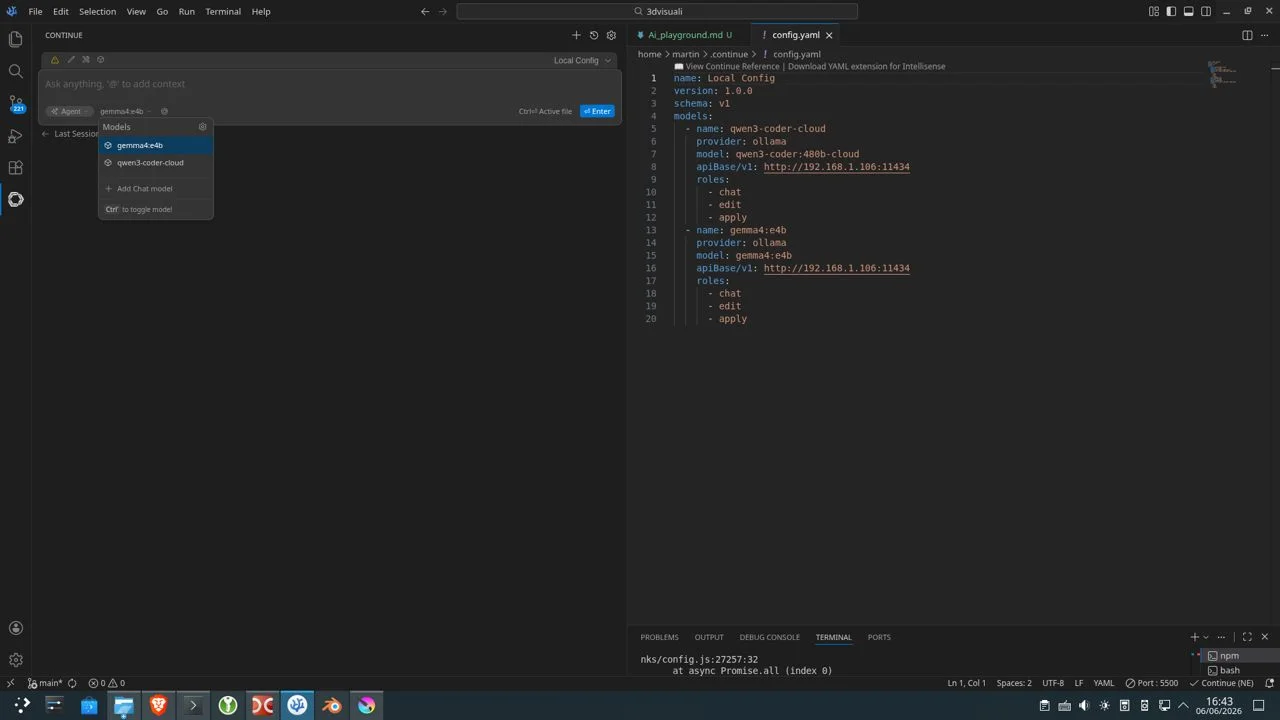
Running Qwen3-Coder:480B in VSCodium with Ollama Cloud
For a while I’ve been running Ollama locally together with OpenWebUI.
The setup works great, but my hardware has its limits. My machine uses an RTX 3070, which means I can comfortably run models up to around 8B parameters. Anything larger quickly becomes slow and impractical for everyday use.
While experimenting with Ollama, I discovered that cloud-hosted models can be accessed through the Ollama API:
https://ollama.com/v1
Even on the free tier, the performance and model quality were significantly better than what I could run locally. Suddenly, models that would normally be impossible on my hardware became usable.
That completely changed the game.
Looking for a Coding Agent
My next step was experimenting with coding agents.
I tried Google’s Antigravity, but I quickly ran into token limits. Since I was already using Ollama, I started looking for something that would integrate with my existing setup instead of adding another platform.
Because I work mainly in VSCodium, I explored extensions and eventually found Continue.
One thing I liked immediately was that Continue can connect directly to an Ollama API instance.
My local models worked without any issues.
The cloud models were another story.
The Problem
I wanted to use Qwen3-Coder 480B through Ollama Cloud.
In OpenWebUI the model was available and worked perfectly.
But in VSCodium (via Continue), the model did not work.
My configuration looked like this:
name: Local Config
version: 1.0.0
schema: v1
models:
  - name: qwen3-coder
    provider: ollama
    model: qwen3-coder:480b
    apiBase: http://localhost:11434
    roles:
      - chat
      - edit
      - apply
All my local models worked fine.
But the cloud models didn’t work, even though they were correctly configured in Continue.
At first I assumed it was a configuration issue, but after testing different setups, that wasn’t the case.
The Solution
After some digging, I found the fix.
Ollama requires cloud models to be registered locally before some clients can see them.
The solution was simple:
ollama pull qwen3-coder:480b-cloudThis does NOT download the model locally.
Instead, it registers the cloud model so it becomes visible through the local Ollama API.
After i just setup the model in VScodium this way
name: Local Config
version: 1.0.0
schema: v1
models:
  - name: qwen3-coder-cloud
    provider: ollama
    model: qwen3-coder:480b-cloud
    apiBase: http://localhost:11434
    roles:
      - chat
      - edit
      - apply
After that, the model started working properly.
What I Learned
Even though OpenWebUI can access cloud models directly, other tools using the local Ollama API may not automatically see them.
Key takeaway:
Cloud models may need local registration ollama pull is not always about downloading Some tools depend on the local model registry, not just the API
If a cloud model is missing, try:
ollama pull qwen3-coder:480b-cloud
Final Thoughts
What started as a way to run better models than my hardware allows turned into a more flexible workflow:
OpenWebUI for experimenting with models Ollama for managing both local and cloud models Continue in VSCodium for coding assistance Ollama Cloud for access to large models
This setup feels like a good balance between local control and cloud capability.
This is the beginning of my AI Playground series, where I’ll keep documenting small but useful discoveries while working with AI tools.